

Most cyberattacks do not start with something obviously suspicious. They start with something that looks normal.
A familiar name.
An ongoing conversation.
A simple request.
Recently, we encountered a real example of a business email compromise that shows how easily even cautious users can be caught off guard.
What happened
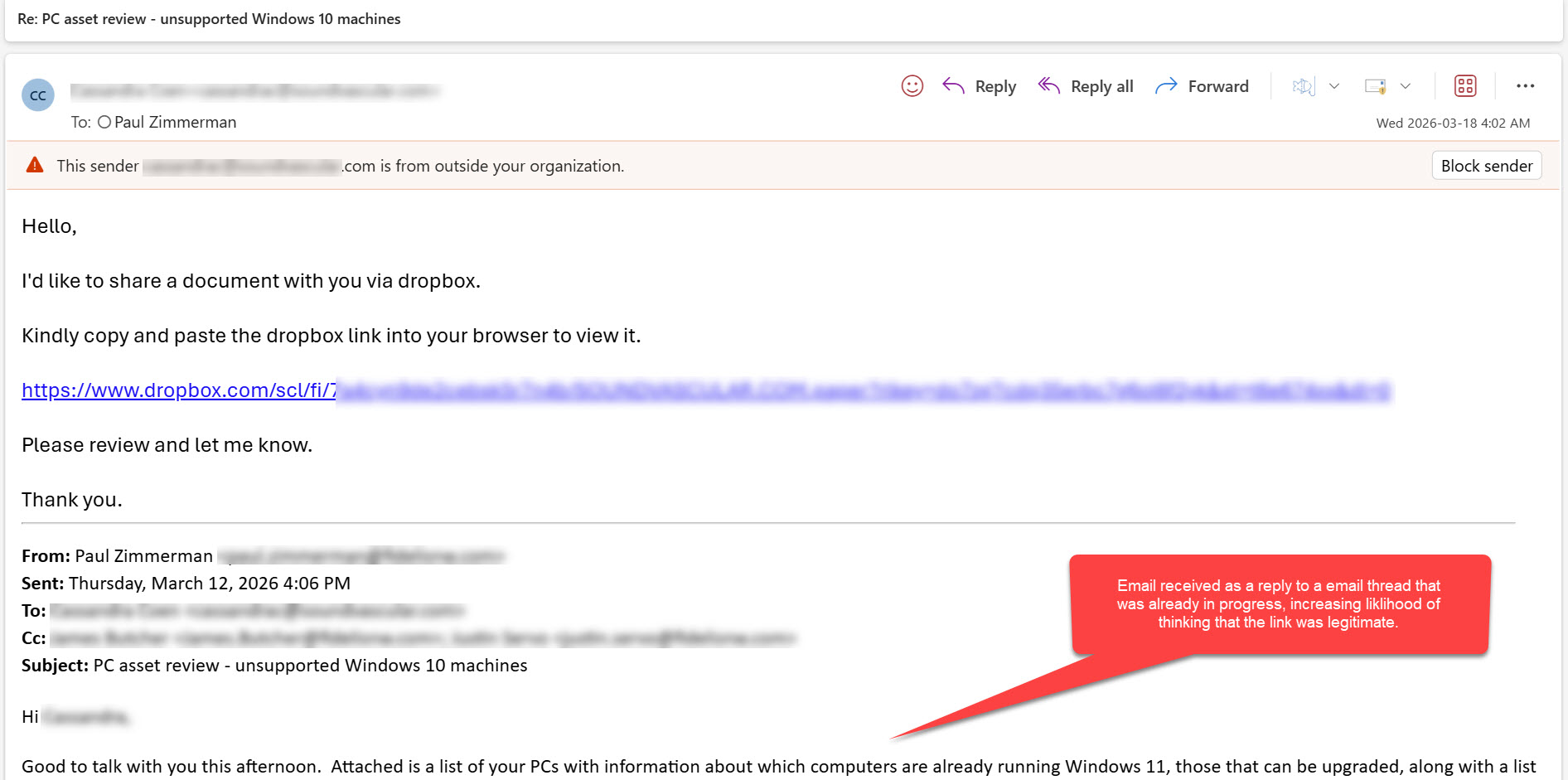
The email came through as a reply to an existing conversation. It was an email from a known contact, replying to an email thread already in progress.
At first glance, nothing seemed out of place.
The message included a request to review a document via Dropbox, which is a commonly used and trusted platform. That alone would not raise concern for most people.
The first subtle red flag
The email included a Dropbox link, but something about it required a closer look.
The link pointed to Dropbox, hovering over or inspecting it revealed the link was a real Dropbox link. This is a common tactic used to build trust while hiding the true ultimate path. And because this was a legitimate Dropbox link, email security scans would not flag this as a malicious link.

A convincing but misleading experience
Clicking the link opened what a legitimate Dropbox Paper document-sharing page.
The page looked mostly normal and included the sender’s name and their domain name. It referred to a shared file and included familiar language. At this stage, some users would hesitate to click on a link to PDF, but since this was in response to an email conversation already in progress, many people would continue opening the link without hesitation.
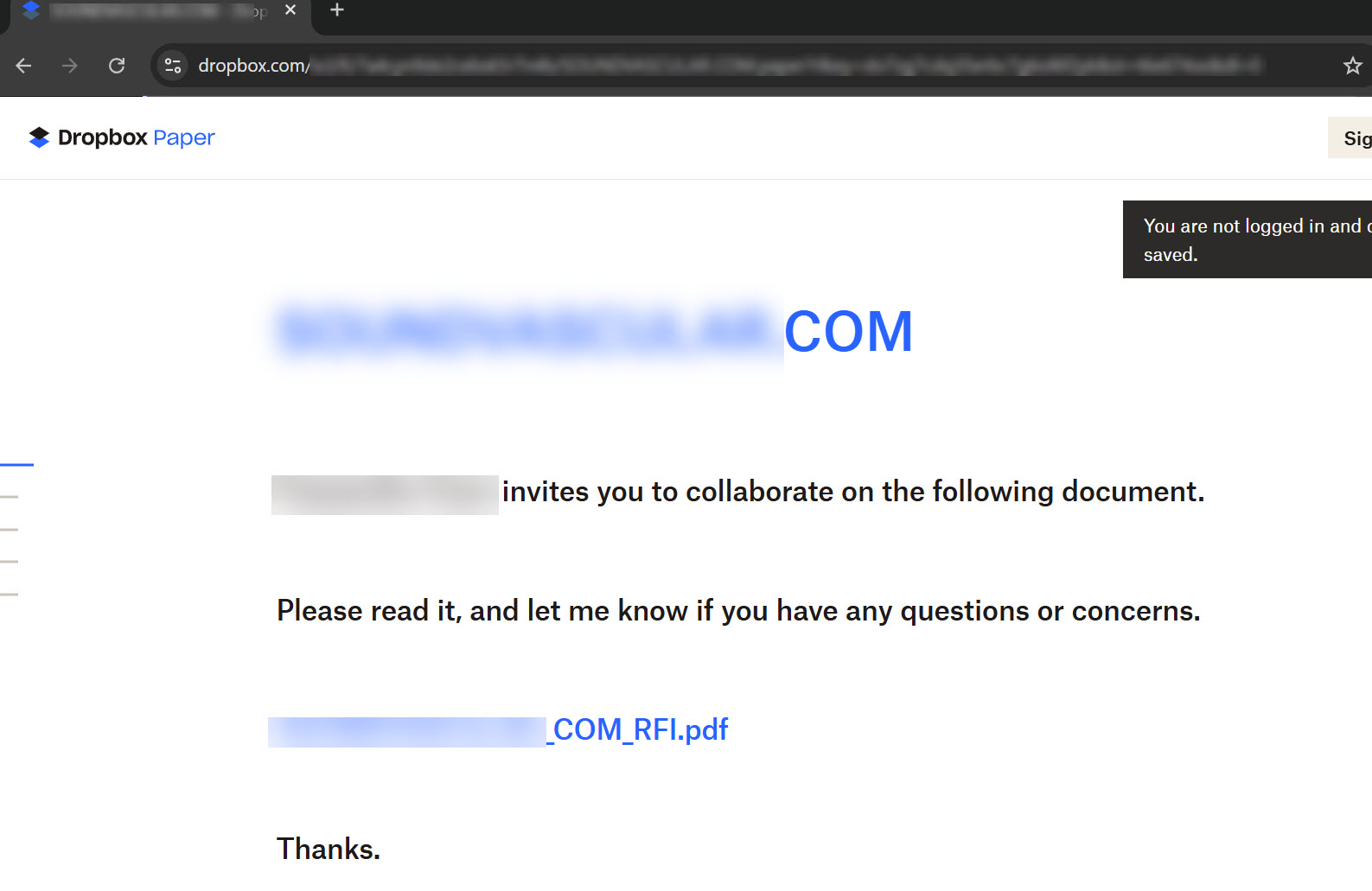
However, the next step revealed the real objective.
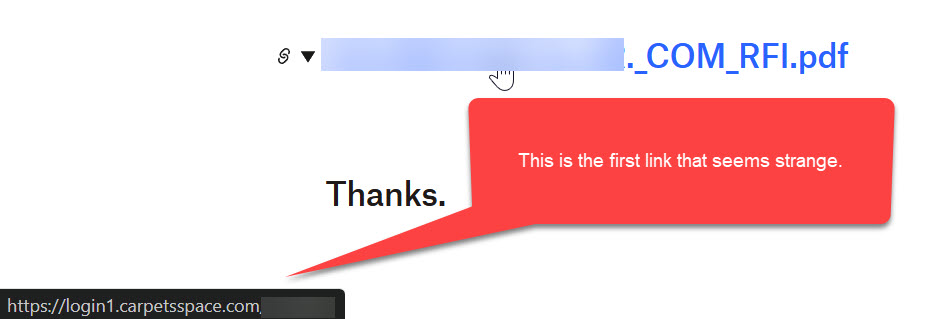
Where the attack leads
Clicking the document link redirected to a Microsoft 365 login page that looked completely legitimate.
The branding, layout, and messaging all matched what users expect from Microsoft. But the URL told a different story. It was not a Microsoft domain.
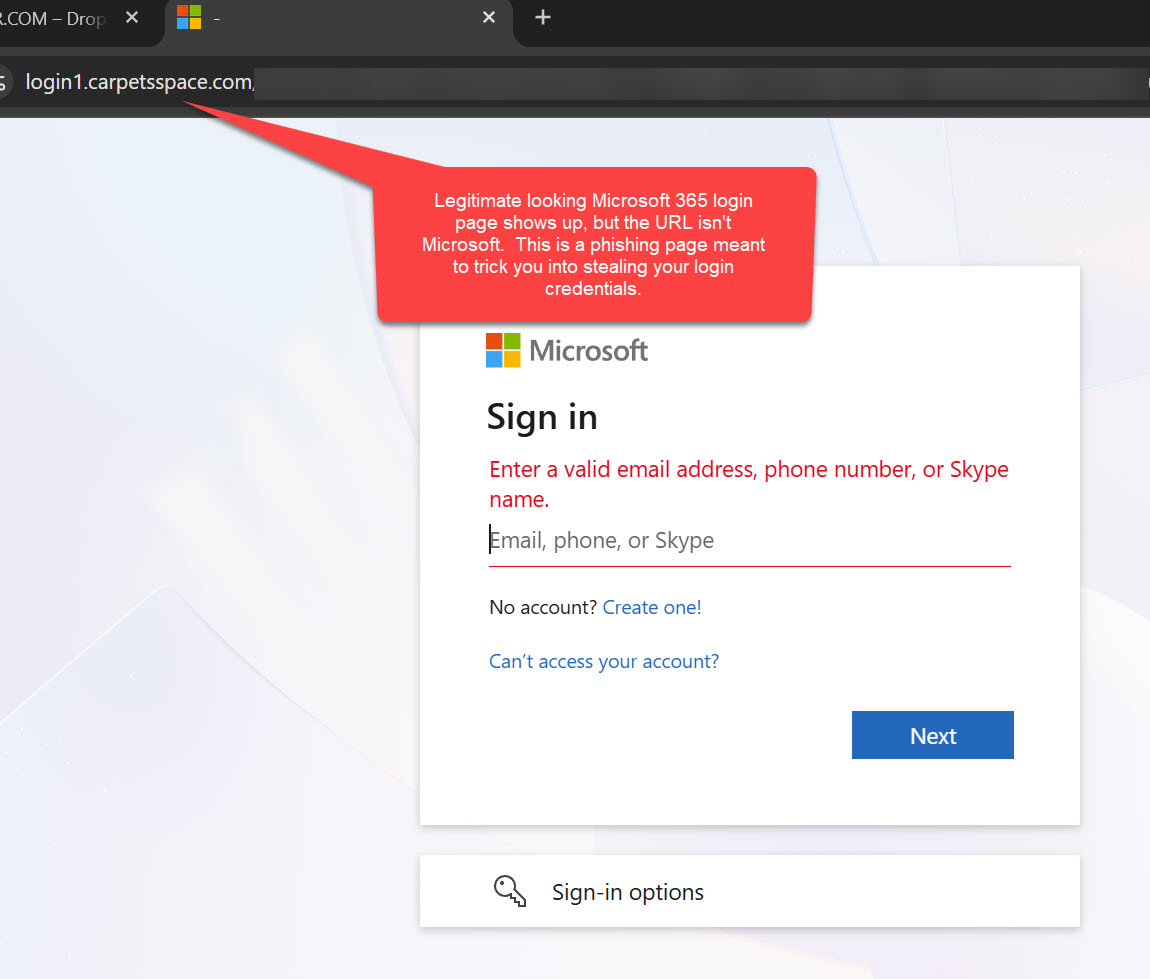
This is where credentials are captured. And because credentials are being used in real-time by the “man in the middle”, most forms of multi-factor authentication would not block this attack. If you provide your credentials, you would then be prompted to accept your MFA “push” notification or enter your authentication code.
Once entered, attackers can:
- Access email accounts
- Monitor communications
- Launch additional attacks internally and externally
- Add their own multifactor authentication method to the account, allowing them to continue to access the account without needing the victim to provide MFA assistance again.
Why this attack is so effective
This was not a generic phishing email. It was targeted, contextual, and timed correctly.
Several factors made it look convincing:
- It came from a real contact whose account had already been compromised
- It continued an existing email thread, lowering suspicion
- It used a trusted platform like Dropbox as part of the process
- It presented a familiar login experience, increasing the likelihood of compliance
This is how modern business email compromise works. It blends into normal business activity instead of standing out.
What to watch for
Even well-crafted attacks leave clues. Training your team to notice these can prevent a costly incident.
Key warning signs include:
- Links that look familiar but contain unusual or unrelated domains
- Requests that slightly change normal behavior, such as asking you to copy and paste links instead of clicking directly
- Links to file sharing services that are unexpected
- Login pages that appear correct but do not match the expected web address
- Emails that feel routine but arrive at unusual times or with subtle wording differences
The goal is not to make employees suspicious of everything. It is to help them pause when something feels just slightly off.
How businesses can protect themselves
Technology alone cannot stop these attacks. Protection comes from a combination of awareness, process, and layered security.
Build a culture of awareness
Employees are your first line of defense. Regular security awareness training helps them recognize modern phishing tactics, not just outdated examples.
Simulated phishing exercises can reinforce this training in a safe, practical way.
Strengthen identity protection
Since these attacks target login credentials, identity security is critical. Implementing strong multi-factor authentication such as Passkeys or FIDO2 hardware MFA tokens require physical proximity, which limits the ability for “man-in-the-middle” credential harvesting attacks like this example.
Implementing additional identity protection tools such as a Managed Identity Detection & Response (ITDR) service can:
- Detect unusual login behavior
- Identify compromised accounts early
- Respond automatically to suspicious activity, locking down accounts to limit damage and spread
This adds a layer of protection even if credentials are exposed.
Monitor for account compromise
Once an account is compromised, attackers often move quickly. Monitoring tools that focus on identity activity can detect abnormal patterns such as:
- Logins from unexpected locations
- Unusual inbox rules or forwarding behavior
- Suspicious access to files and systems
Early detection limits the impact.
Reinforce email and access controls
Basic controls still matter. These include:
- Strong authentication policies
- Conditional access rules based on risk
- External email warnings for messages coming from outside your organization
These measures help reduce exposure without disrupting productivity.
A practical takeaway
This incident is a reminder that cyberattacks are no longer just technical problems. They are business risks.
They target trust, routine, and human behavior as much as systems.
The organizations that handle this best are not the ones that avoid all risk. They are the ones that prepare for it, train their teams, and put the right safeguards in place.
Partnering for protection
At Fidelis, we work with organizations across the Pacific Northwest to reduce the risk of business email compromise and account takeover. We focus on practical, layered protection that supports your team without slowing them down.
If you would like help evaluating your current security posture or strengthening your defenses against these types of attacks, contact Fidelis.