
A disaster recovery (DR) plan documents what data and systems must be recovered, in what order, how quickly, from which source, and by whom. It should function as an operational manual, with recovery procedures that have been tested before any actual disruption occurs.
A DR plan bridges the gap between simply having backups and actually being able to resume operations during an outage. An effective DR plan is therefore essential for the success of any business continuity plan, which will depend on the restored technology.
This guide outlines what you need to develop your organization’s DR plan, including identifying risks and then defining the roles, responsibilities, and actions that will help your organization minimize damage and restore operations quickly.
What is a business disaster recovery plan?
A business DR plan is a formal document detailing how your organization will restore the data, applications, connectivity, access, and supporting infrastructure required to resume operations after a disruption.
As outlined by emergency preparedness resources like the US Department of Homeland Security’s Ready.gov, a DR plan covers far more than just natural disasters like fires or floods. It provides clear response instructions for a wide range of incidents, including:
- Hardware or server failures
- Ransomware or other cyberattacks
- Accidental data corruption or deletion
- Power or connectivity failures
- Cloud or Software-as-a-Service outages
- Loss of access to a key system or location
Disaster recovery vs. business continuity
These terms are closely related but serve distinct purposes. Disaster recovery is the planned technical execution of restoring your systems, applications, and data after a disruption. Business continuity addresses the broader question of how your organization will continue operating during and after the disruption — things like temporary workspaces, substitute communication channels, and manual workflows. Business continuity is what happens while your IT team is executing your disaster recovery plan. The DR plan is therefore critically important to surviving any of the disruptions listed above.
You can learn more about the relationship here: What’s the difference between business continuity and disaster recovery?
What should a small business disaster recovery plan include?
The core elements of a disaster recovery plan should cover your risk factors, critical systems, recovery targets, and response procedures.
These can be divided into nine disaster recovery plan components which are essential to building an effective DR plan:
- Risks and disruption scenarios
- Critical systems, data, and dependencies
- Recovery targets for each critical system
- Backup and restoration sources
- Recovery roles and responsibilities
- Recovery procedures and escalations
- Communication and vendor information
- Recovery plan testing and validation
- Recovery plan reviews and updates
The rest of this article takes you through each of these DR plan components in detail to help you build your own.
1. Identify the risks and disruption scenarios that could stop your business operations
Recovery planning does not require you to predict every conceivable emergency. Instead, it begins by identifying realistic events that could make your critical systems, infrastructure, or information unavailable. Your organization should plan for the practical risk scenarios that actually threaten your daily work.
Common disruption scenarios
Plan for incidents that can directly affect your technology and access, including:
- Ransomware or other cyberattacks
- Hardware failures
- Accidental data corruption or deletion
- Microsoft 365 or other cloud-service outages
- Internet or telecommunications outages
- Extended power outages
- Building access problems
- Fire or water damage
- Loss of an essential vendor or service provider
Focus on business impact, not the disaster itself
With the risk factors defined, the most important question is not what disasters could happen?, but rather, which of our business functions would stop, and what would we need to restore them? Answering these questions is the essence of DR planning.
By focusing on the outcome rather than the specific event, you can effectively plan for the resulting business impact and mitigate its damage. It’s important to understand what processes your organization cannot operate without. For example, consider what would happen if:
- Payroll cannot be processed.
- Staff cannot access digital tools, email, or shared files.
- A healthcare business cannot access patient scheduling or records.
- A nonprofit cannot access donor or fundraising systems.
- A manufacturer loses access to production-support systems.
- A retailer loses access to inventory control or POS systems.
2. Identify your critical systems, data, and dependencies
To build a functional recovery strategy, you must document exactly what needs restoring. This requires moving beyond a basic inventory of servers and software to understand the complete technology stack needed to resume operations
Start with the systems the business cannot operate without
Identify the core tools required for daily operations. For most organizations, this includes Microsoft 365 or Google Workspace, centralized file storage, CRM platforms, accounting or payroll software, and specific line-of-business applications. You must also account for customer or donor databases, server infrastructure, cloud applications, phone systems, remote access systems, and identity or authentication services.
Document the dependencies behind each system
A system might be technically restored but remain unusable if a critical dependency is unavailable. For example, an application may rely on a separate database, or employees might need Microsoft Entra ID or Google Workspace identity services functioning before they can log in. And of course, cloud tools inherently require working internet access.
Organizations frequently overlook hidden dependencies like DNS configuration, multifactor authentication routing, or third-party API connections. A restored server still depends on underlying networking, VPN access, proper licensing, and vendor availability. Furthermore, a SaaS system depends entirely on an external provider’s uptime.
Assign a business owner to each critical function
Every critical system needs a designated business owner who understands why the tool matters and the operational impact if it remains offline during a disruption. While the IT team handles technical recovery, this individual manages their team’s temporary manual workarounds and acts as the single point of contact for IT updates. Once systems are restored, the business owner validates data accuracy before staff officially resume normal operations.
3. Set your RTO and RPO recovery targets for each critical system
What is an RTO?
Recovery time objective (RTO) is the maximum amount of time a system can be down before the impact is unacceptable. Different systems can have different RTOs. For example, if you are able to live without your payroll software for one business day, but your customer service platform cannot be down for more than two hours, those are different RTOs and responses.
The RTO essentially starts the clock for your IT team during an emergency, so they know which systems to restore first and how much time they have.
What is an RPO?
Recovery point objective (RPO) defines the maximum amount of data your organization can afford to lose. It doesn’t define the amount of data (like gigabytes); instead, RPOs are measured in time: the interval between the last backup and the disruption event. This time period indicates how far back in time you can recover data after a disruption.
Your RPO dictates how frequently you back up your files. If a critical system has an RPO of four hours, your recovery process needs to restore data from four hours (or less) before the incident occurred.
Different systems should have different recovery priorities
When choosing a backup and disaster recovery solution, do not try to assign a single organization-wide RTO or RPO. Instead, consider each system’s operational impact, data sensitivity, compliance requirements, the financial cost of downtime, and the price of the recovery technology itself. An effective way to simplify these considerations is by creating recovery tiers.
Create recovery tiers
Prioritizing your technology helps your IT team know what to fix first. Here are some example recovery-priority tiers.
- Tier 1: Must restore immediately or within one hour
- Tier 2: Can tolerate being offline for several hours
- Tier 3: Can wait until core operations are fully restored
| System | Recovery tier | Example RTO | Example RPO |
|---|---|---|---|
| Critical customer system | Tier 1 | 1 hour | 15 minutes |
| Tier 2 | 4 hours | 1 hour | |
| Internal archive | Tier 3 | 24 to 48 hours | 24 hours |
4. Backup and restoration sources: List where your recovery data comes from and how it will be restored
Data backups, while essential, can create a false sense of security. On their own, they cannot restore your systems. Your DR plan makes the difference between simply having your data backed up and having an effective recovery process that gets your operations running again.
Document the backup source for each critical system
A reliable disaster recovery strategy relies on knowing exactly where your data lives. For every critical system, your DR plan should identify what data is backed up, the physical or cloud location where the backup is stored, and how frequently the system creates copies. You also need to document how long backups are retained, the specific person or vendor who manages them, and the exact steps required to access this data during a widespread outage.
Include more than just servers
Modern networks extend far beyond local servers. Your DR plan may need to account for Microsoft 365, SharePoint, OneDrive, or Google Workspace environments, as these cloud platforms do not automatically provide comprehensive backups of your data. Additionally, ensure you document the recovery sources for specialized SaaS applications, cloud-hosted databases, virtual machines, individual user devices, and critical data for network-device configurations.
Know the difference between a successful backup and a successful recovery
A backup dashboard displaying a green “success” status does not guarantee you can actually resume operations. Restoring raw files is only the first step. A true recovery process ensures you can successfully restore the functioning application, the data, the exact user permissions, active software integrations, and all supporting systems within your required recovery window.
Protect recovery data from the same incident
If ransomware infects your network, it will actively attempt to encrypt your local backups. To ensure a reliable restoration, your recovery copies need strict separation from your production environment. You can achieve this protection by utilizing an off-site backup, an isolated backup, or a fully “air-gapped” backup disconnected from the network. Furthermore, leveraging a permanent immutable backup ensures that once your data is saved, it cannot be altered or deleted through user error or by a malicious actor.
5. Assign recovery roles before an incident happens
Disaster recovery planning is not only for large organizations with enterprise-level resources. Smaller businesses and nonprofits can create workable DR plans regardless of their headcount or resources.
In smaller organizations, staff often handle multiple responsibilities simultaneously. However, during a technology emergency, informal responsibilities can lead to confusion and delays. Your DR plan will assign specific roles so everyone knows exactly what to do. Some typical roles include:
Recovery lead
Someone must decide when to officially activate the disaster recovery plan and coordinate the overall response. In a small organization, this is typically the owner, an operations director, or a senior manager.
Technical recovery owner
This role is responsible for executing the actual system restoration and working directly with technology vendors. Depending on your IT structure, your technical recovery owner could be your internal IT staff, your managed service provider, or a co-managed combination of both teams.
Business communication owner
While the IT team restores your systems, someone needs to manage the communications. This person sends vital status updates to leadership, employees, clients, vendors, and applicable insurance providers.
Assign a backup for every critical role
Your recovery strategy cannot depend on one person, because if they are unavailable during the incident, the response cannot move forward. You need a designated backup for every ownership role. This secondary person needs a way to access all system documentation, vendor contact information, clear escalation paths, and exact recovery instructions.
6. Recovery procedures and escalations: Define first actions and the response sequence
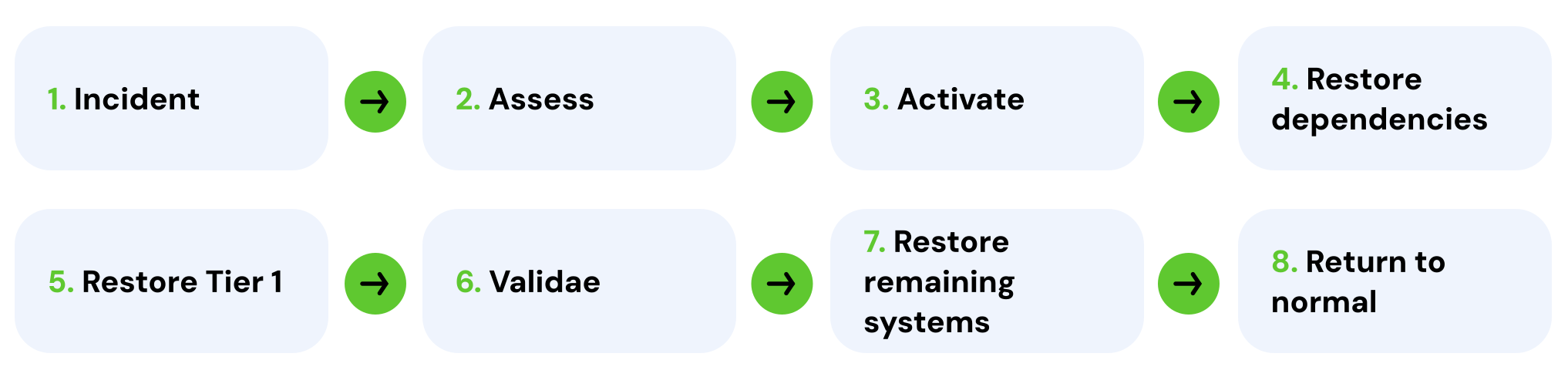
A disaster recovery plan needs to function as a practical operational playbook that guides your team through the first critical hours of an incident.
Define when the disaster recovery plan is activated
A plan is useless if nobody knows when to execute it. The exact activation criteria depend on your organization, but common triggers that justify activation include:
- A critical server fails.
- Production systems become unavailable.
- A cyberattack prevents normal access.
- The primary premises cannot be used.
- Critical data has been deleted or corrupted.
- A cloud or vendor outage exceeds an acceptable threshold.
Establish the recovery sequence
Once activated, your team needs a strict order of operations to prevent confusion and wasted effort. A standard sequence should follow these steps:
- Confirm what has failed.
- Contain the incident where possible.
- Determine which business functions are affected.
- Activate the appropriate recovery procedures.
- Restore Tier 1 systems first.
- Restore required dependencies.
- Verify data and access.
- Restore lower-priority systems.
- Confirm normal operations.
- Review and document the incident for future risk mitigation.
Document system-specific recovery instructions
The main disaster recovery document does not need to contain every technical step. It should, however, clearly tell the recovery team where detailed technical instructions live and exactly who has access to them. The documentation must also identify the vendor(s) to contact, which backup or recovery environment to use, and which data to validate before users are allowed back into the restored system.
7. Document your communication, vendor, access, and escalation information
During a disruption, teams often lose critical time searching for account numbers or support contact information. Make sure your DR plan includes the operational details required to actually execute the recovery.
Internal communication
Document who is responsible for informing employees about the disruption and which specific communication channel they will use. Critically, you need to establish what happens if your normal communication system, such as Microsoft 365, Teams, or email, is unavailable.
Vendor and service-provider contacts
A recovery often requires outside help. Include contact information for all of your service providers, including your:
- Managed IT service provider
- Telecom and internet service providers
- Cloud vendors
- Backup provider
- Cybersecurity provider
- Line-of-business software vendors
- Building/Facility contacts, if relevant
- Insurance provider
For every critical vendor, document a clear escalation path to bypass standard customer service queues.
Emergency access
Authorized personnel need access to recovery information even when normal systems are down. This can include administrative credentials, vendor portals, support contracts, account numbers, and emergency contact details. Your disaster recovery plan should explicitly tell authorized users how to access these credentials securely, typically through a centralized password management system or a formally designated emergency access process.
8. DR plan testing and validation: Test it before you need it
A DR plan is just theoretical until it is proven to work. For effective recovery, you need to validate your response procedures and capabilities before a real emergency occurs.
Start with restore tests
Validate your backups by conducting routine, isolated restore tests. Begin with straightforward tasks, such as restoring a deleted file or recovering an email mailbox. Then, progress to restoring a critical application, an entire server, or a complete virtual environment where appropriate.
Run a tabletop exercise
You do not need to take production systems offline to practice. You can safely test your disaster recovery plan by running a tabletop exercise. Present a realistic scenario to your team: “The primary server is unavailable at 8:00 a.m. on a Monday. What happens next?” Walk through the exact response: Who gets contacted? Who decides what to recover? Where are the recovery instructions? Which systems return first, and what are employees told? Work through these so everyone will be prepared with answers when an actual incident occurs.
Test the recovery time, not just whether recovery is possible
Proving data can be restored is not enough; you must measure how long the entire process takes. During your tests, record the actual restore time and document any problems. Identify missing dependencies, outdated vendor information, or unexpected authentication and access problems. Use this data to determine whether the result actually met your intended RTO and RPO.
Fix the plan after every test
The primary goal of a test is to find flaws and make adjustments. Every exercise should result in updates to your DR planning document, ensuring your strategy improves before a genuine disruption occurs. Guidance on updating your DR plan can be found here: How to test your recovery plan without disrupting your business.
9. Review and update your DR plan as your organization changes
Your disaster recovery plan is not a one-time project and can quickly become outdated if it doesn’t evolve alongside your organization.
Update the plan after meaningful changes
Revise your DR planning document immediately following the implementation of new systems, a cloud migration, an office relocation, or the introduction of new vendors. You must also adjust your procedures to account for staff changes, network infrastructure upgrades, new backup tools, mergers or acquisitions, new compliance requirements, or lessons learned after a major incident.
Record ownership and testing history
To maintain accountability, the document should track its own history. It needs to list the designated plan owner, the date it was last reviewed, and the date it was last tested. Finally, keep a running log of any changes made and document any outstanding recovery issues that still require resolution.
An example small business disaster recovery plan
Now, let’s take these concepts and create a visual example. Reviewing example disaster recovery plans can clarify the planning process, and to help you create your own, we have provided a basic small business example below.
While a real production environment requires greater technical detail than is included here, this DR plan template demonstrates how to organize the core operational information for each of your critical systems.
(Note that the RTO and RPO numbers shown here are strictly illustrative and not recommendations.)
Recovery priorities
| Business system | Owner | Priority | RTO | RPO |
|---|---|---|---|---|
| CRM | Sales/IT (owner's name) | Tier 1 | 2 hours | 1 hour |
| Microsoft 365 | IT (owner's name) | Tier 1 | 4 hours | 2 hours |
| Accounting | Finance (owner's name) | Tier 2 | 24 hours | 4 hours |
| Archive | Operations (owner's name) | Tier 3 | 48 hours | 24 hours |
Recovery details
| Business system | Recovery source | Dependencies | First action | Last tested |
|---|---|---|---|---|
| CRM | Cloud backup/vendor | Identity + internet | Contact vendor/initiate recovery | Oct 2026 |
| Microsoft 365 | Microsoft + backup provider | Identity + internet | Validate service/access | Oct 2026 |
| Accounting | Application backup | Database + authentication | Restore latest usable copy | Aug 2026 |
| Archive | Backup repository | Storage | Restore after critical systems | Aug 2026 |
Here is what each of the above columns represent:
- Business system: The specific application, server, or function
- Owner: The person responsible for managing the response and business impact
- Priority: The designated recovery tier determining the order of restoration
- RTO and RPO: Your defined targets for acceptable downtime and data loss
- Recovery source: The location of your backup data
- Dependencies: The infrastructure required before the system can function
- First action: The immediate step required to initiate the recovery process
- Last tested: The date of your most recent validation exercise
What this table does not replace
This table provides an example high-level overview to outline the initial emergency response. However, a complete DR plan will link directly to detailed technical recovery instructions for your IT staff. It will also include vendor contact information, internal communication procedures, emergency access protocols, and detailed testing records to ensure the strategy actually works when your business needs it most.
When should a small business get help with disaster recovery planning?
Not every small business needs an external partner for disaster recovery, especially if you maintain a simple environment and a fully tested plan. However, if your technology footprint grows, outside expertise can become highly valuable.
Consider seeking assistance with DR planning if:
- No one clearly owns your disaster recovery process.
- You rely on one internal IT person.
- Backups exist but have never been fully restored.
- Nobody knows your organization’s RTO and RPO requirements.
- Multiple vendors are involved, or you depend heavily on cloud and SaaS platforms.
- Cybersecurity threats or compliance requirements are increasing.
- Leadership cannot answer how long critical operations would remain down after an incident.
- Your business has simply grown beyond an informal recovery process.
The objective of outside help is to eliminate guesswork. A dedicated backup and disaster recovery partner will help identify your recovery priorities, verify your current backup environment, document critical gaps, and establish a formal recovery process that can be thoroughly tested.
Your disaster recovery plan should tell you exactly what happens next.
The quality of a disaster recovery plan is determined by whether your organization can actually use it during a disruption. A reliable DR plan moves beyond basic backups and allows your team to respond to a disruption by quickly answering the following questions:
- What failed?
- What needs to come back first, and how quickly?
- How much data can we afford to lose?
- Where will we recover from?
- Who is responsible?
- How do we know the process works?
Fidelis offers guidance for every stage of DR planning. We can help you review your critical systems, recovery priorities, backups, and current DR procedures to identify gaps before an actual outage exposes them.
Give us a call or book a consultation through the link below. It’s free of cost and obligation, and you’ll have a real person sharing their expertise and answering your questions.
Frequently asked questions about small business disaster recovery plans
What is the difference between a disaster recovery plan and a business continuity plan?
Disaster recovery focuses on restoring an organization’s data and systems after a disruption.
Business continuity covers the ability of the organization to use the recovered data and systems to keep operating.
For more information, see our article, What’s the difference between business continuity and disaster recovery?
How often should a disaster recovery plan be tested?
Many organizations update and test their DR plan annually, but there is no ideal cadence for every organization. Your testing frequency should reflect business criticality and risk, regulatory or contractual requirements, and whenever there are major system changes.
For more information on when to test your DR plan, see our article, How to test your disaster recovery plan without disrupting your business.
What is an example of an RTO and an RPO?
For example RTOs and RPOs, consider a hospital’s patient scheduling system.
The hospital might require a recovery time objective (RTO) of one hour, because staff need immediate access to appointments to operate.
The recovery point objective (RPO) might be 15 minutes to minimize the loss of newly-entered patient data in the event of a failure or outage.
Conversely, a historical internal document archive might easily tolerate an RTO of 48 hours and an RPO of 24 hours. This is because staff may not rely on past records to complete daily, revenue-generating tasks, and the business can afford to wait two days to regain access. Furthermore, since historical files are rarely updated, backing up the data just once a day is sufficient to capture new additions without wasting storage resources.
Note that these numbers are purely illustrative. Your actual recovery targets must be based on your specific business requirements, acceptable downtime constraints, and technology budget.
Where should a disaster recovery plan be stored?
Your DR plan must be stored outside of your primary network environment. A common mistake is saving the DR plan on the same servers or cloud platforms it is intended to protect. If a ransomware attack encrypts your local network or Microsoft 365 experiences a major outage, you cannot rely on those systems to retrieve your recovery instructions.
Instead, maintain multiple isolated copies. Store digital versions in a secure, encrypted IT documentation portal or a secondary cloud environment disconnected from your main infrastructure. You should also keep secure, printed physical copies at an off-site location or with key leadership. Because a DR plan contains sensitive vendor information, escalation paths, and infrastructure details, access to all copies must be strictly limited to authorized recovery personnel.
Can a small business create a disaster recovery plan without an internal IT department?
Yes. Ownership of DR planning can sit with leadership or operations while an MSP or another technical partner handles the recovery procedures. The key requirement is that roles, access, responsibilities, recovery targets, and escalation paths are explicitly documented.